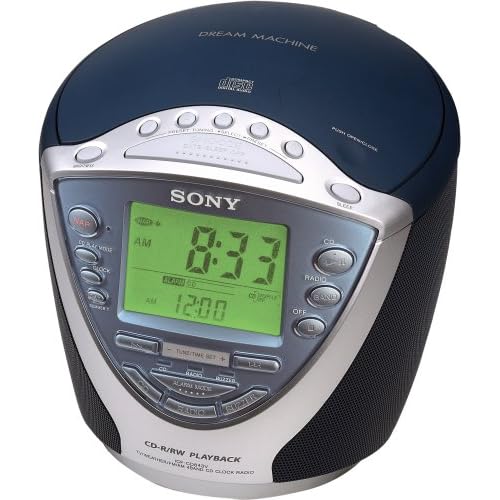
In my bedroom there are five devices with alarm clock capabilities: two regular alarm clocks, a cell phone, a laptop, and an mp3 player. None of these devices are particularly reliable or easy to use and they all function differently. With many of them, setting an alarm--a task that many people need to do daily--is as difficult as setting the clock on a DVD player or microwave.
My Sony Dream Machine ICF-CD843V (shown above) is the best among these evils. A quick look at its Amazon listing reveals many of its problems. One reviewer submits this one-star entry:
"I NEED SOMEONE TO TELL ME HOW TO SET THE CLOCK RADIO. I PRESS CLOCK ON THE SIDE BUT NOTHING HAPPENS AFTER I PRESS THE UP AND DOWN BUTTONS. HELP!"
There's even a post on eHow.com explaining how to set the alarm. And this is the best of the five options that I own! But for an experienced user such as myself, knowing how to set an alarm is not the problem. The problem is actually doing it.
Last Tuesday, I slept through a class presentation because I had failed to notice that the alarm was set for PM instead of AM from the previous day's afternoon nap. While this problem is rare, it consistently happens to me at least once every few months. This is not an acceptable failure rate; I need an alarm clock that I can trust to work every time. Nor is this problem the user's fault; the alarm time's AM/PM marker is tiny and is not located in the standard position after the time. Go ahead and see if you can find it in the picture above. Now pretend that you're exhausted and it's dark in the room. Not easy, is it? (hint: it's to the left of 12:00)
One solution to this problem, discussed by Don Norman in The Design of Everyday Things is to use 24-hour military time, or (even better) metric time. But standards should rarely be ignored in cases like this. A user seeing 21:00 may be confused or think that his alarm clock is broken. Worse, a user wishing to nap until 8:00PM may just set the alarm for 8:00 military time and sleep until the next morning.
Another possibility is to employ a forcing function, whereby users are required to hit either an AM or PM button after entering the time. This forces the user to consider which time has been selected, rather than relying on the previous time to be in the correct 12 hour ballpark. This is surely a better solution than the existing system, but there's always the problem of hitting the wrong button by accident. Tired users are particularly prone to errors such as this, but at least this solution provides a pause for people to consider the AM/PM decision, preventing them from skipping over it.
My best idea that so far is a slider design:

As you can hopefully see (sorry for the crappy jpeg; Blogger is giving me problems), the alarm time is set by two sliders: one for hours, one for minutes. The hour slider clicks at discrete intervals, while the minute slider can be adjusted continuously. A switch and corresponding LED activate the alarm and provide feedback. In the picture above, the alarm is set for 6:38AM.
This design eliminates the need to distinguish between AM and PM, since the slider covers an entire day. It is also very fast and intuitive to set. A snooze feature could either be implemented in the traditional way or a user could simply adjust the bars for another 10 minutes of sleep.
I'll be the first to admit that this design isn't perfect. First, I wasn't sure whether to include 12:00AM and :00 respectively at the end of the sliders. I could easily see a user setting the alarm for 6:30AM one day and then moving the minute slider all the way to the right the next day, intending to set the alarm for 30 minutes later. This problem could probably be fixed by ending the sliders at 11:00PM and :59, respectively.
Second, this design does not address countless other problems with alarm clocks. One common issue is accidentally turning off the alarm without waking up. There are lots of fun designs that try to address this problem in some pretty creative ways. I haven't addressed these here, though.
Anyways, I'd appreciate some feedback! Can you see any problems with the slider design? Do you have alternative ideas? Insightful stories about bad alarm clock experiences would be appreciated as well.


 Posts
Posts


I like the concept of the slider design. However, I would caution the use of an entirely analog input in this age of pure digital. I do agree that most alarms are tricky to set. Fortunately for me, I have the same alarm clock that I've had since middle school, and its very intuitive.
ReplyDeleteOne suggestion I would have to adapt the slider to an analog display would be to have a slider indicator above the alarm time. As one is incrementing the time that the alarm is set, the slider would steadily move (just as your slider does) from 12:00 AM to 12:00 PM. That way the user would have a visual indicator of roughly where in the day they were trying to wake up, while also maintaining the digital display. This method could easily be adapted for alarm clocks of all types and sizes.
I don't think you need to distinguish between hours and minutes in separate sliders -- why not just have one? Rarely do you need to have such precision, like 6:38 vs. 6:40. I think you could still have the slider click at the hours, but you have one spectrum to adjust instead of two.
ReplyDeleteYou'd also probably want to backlight the entire range as well as the slider itself -- that way you have a visual cue as to roughly where in the day the alarm is set, just by looking at it. And if you had this slider system positioned on the front of the clock or along the top-front edge, you'd want to have the slider light visible there, since rarely are you looking at the top of the alarm clock, except when setting it.
People also frequently think they've turned the alarm on when they really haven't, so why not color the lighting, too -- red or no color for no alarm, green for alarm set?
And regarding the usability of actually setting the time, you really only need to have one clock readout. It should default to showing the time, but when you start moving the slider, show digitally what the alarm is being set to. You can then achieve the time precision, down to the minute, if you require it. The clock display could hold that time for a few seconds after the slider stops moving, then revert to clock time.
I had a Sony alarm clock that I loved until the LED display went South and it became useless. I haven't been able to find another like it and don't know why. The best feature was two rotary knobs dominating the front. One was for hour (in 24 hour format) the other for minutes (in 5 minute increments).
ReplyDeleteSetting or checking the alarm time involved ensuring the knobs were in the right position and pressing the snooze bar on top to cause the LED display to confirm that the alarm was indeed "on" (it would display the alarm time in digital format).
Why would Sony drop this design? I would have thought dozens of similar clocks would be on the market by now, but alas it has gone the way of the dodo.
Another thought about using analog controls for the alarm time - If the clock had one of those radio receivers for the time of day, it could recover after a power failure to know what time it was. If there were analog controls (knobs or sliders), it would know what time the alarm was set and recover that as well.
ReplyDeleteI like the slider design. To address the issue of turning the alarm off without waking up, do what I do: Put the alarm clock across the room on your dresser with the volume turned all the way up to an annoying sound. I am forced to get out of bed to turn it off.
ReplyDelete